ValidMind Jupyter Notebooks
Developer Content
Jupyter Notebook use case demonstrations written for ValidMind’s Python library.
Content Engineering
I transformed ValidMind’s rudimentary training resources into a comprehensive learning academy to empower users to maximize their use of the product.
Along with authoring the bulk of ValidMind’s user guidance content, I also transformed our rudimentary training resources into a comprehensive learning academy to empower users to maximize their use of ValidMind.
As a newcomer to ValidMind and the risk management space, I knew I had an advantage others did not — I could approach both our product and user guidance content with curiosity and a fresh perspective, without the baggage of prior assumptions or preconceived notions as to how things should be done and presented.
The initial versions of the training lived in the cluttered Quickstart section,1 and contained draft modules that did not cover enough fundamental functionality of ValidMind relevant to each role, or effectively guide users through thoughtful and curated learning journeys.
As with the old quickstart experience, most of the training was focused on the developer role, with very sparse material for the validator and administrator roles.
Only a poorly laid-out developer demonstration notebook existed, and an executed (with code run outputs) version of the notebook was initially generated via a very manual workflow.
A writer would make a copy of the notebook every time it was updated, freshly run the code, remove any identifying API keys, then upload the notebook with output artifacts to replace the older version displayed within the developer training module.
After designing and implementing a discrete training portal that still connected to the rest of the documentation site branding to signify a shift in content and medium, I extended the curriculums for each role to ensure that users were properly equipped to understand the fundamentals of ValidMind and show value in the product through interactive demonstrations.
Each training course was now broken out into four guided modules built on Reveal.js,2 with the product embedded live in iframes, supported by a custom pop-up overlay3 and styled consistently with the training portal’s theme.
2 Quarto: Revealjs
3 validbeck/slideover: Extension Archive
Each role was now onboarded onto ValidMind through a journey where subsequent module built on the knowledge gained in the previous modules, culminating in final module that wrapped up the series with either a complete sample project or a fully configured instance of ValidMind’s frontend application.
Along with producing a edited version of the developer demonstration notebook, now delivered clean and clear in a four-part series that aligned with each module of the developer training curriculum, I also authored a brand new series of validation demonstration notebooks for the validator role, aligned with each module of the validator training curriculum.
Instead of a writer having to manually execute (run code cells) the notebooks each time they were updated, and uploading the version with execution artifacts to embed into the training, now a GitHub composite action5 chained to our production deployment workflows execute the notebooks on the fly, thanks to Quarto’s native JupyterLab support:6
5 GitHub: Creating a composite action
6 Quarto: JupyterLab
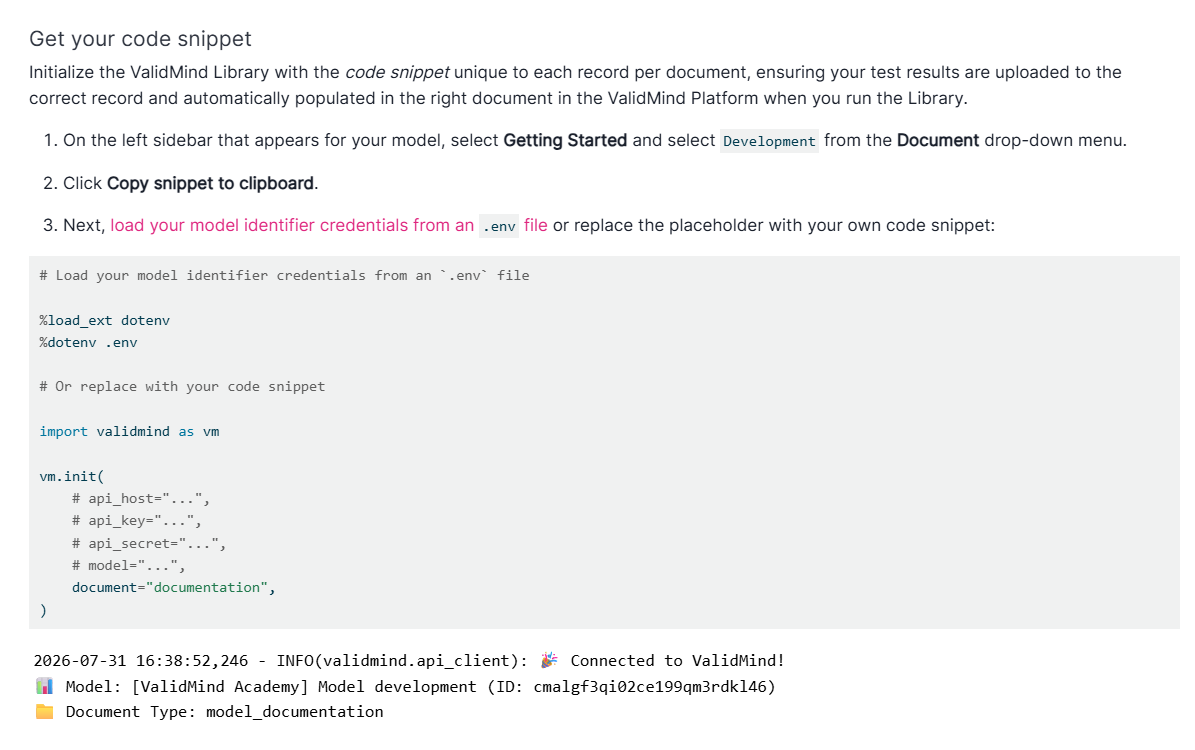
A GitHub Workflow that runs when we deploy to production creates our required API credentials in .env files on the fly, then passes these credentials to the notebook execution action:7
7 Archive of validmind/documentation: Notebook Execution Workflow
      - name: Create dev.env file
        id: create_dev_env
        run: |
          touch dev.env
          echo VM_API_HOST=${{ secrets.PLATFORM_API_HOST }} >> dev.env
          echo VM_API_KEY=${{ secrets.PLATFORM_API_KEY }} >> dev.env
          echo VM_API_SECRET=${{ secrets.PLATFORM_API_SECRET }} >> dev.env
          echo VM_API_MODEL=${{ secrets.PLATFORM_DEV_MODEL }} >> dev.env

      - name: Create valid.env file
        id: create_valid_env
        run: |
          touch valid.env
          echo VM_API_HOST=${{ secrets.PLATFORM_API_HOST }} >> valid.env
          echo VM_API_KEY=${{ secrets.PLATFORM_API_KEY }} >> valid.env
          echo VM_API_SECRET=${{ secrets.PLATFORM_API_SECRET }} >> valid.env
          echo VM_API_MODEL=${{ secrets.PLATFORM_VALID_MODEL }} >> valid.env

      # Only execute the production notebooks for training if .env files are created
      - name: Execute production ValidMind for development and validation series
        if: ${{ steps.create_dev_env.outcome == 'success' && steps.create_valid_env.outcome == 'success' }}
        uses: ./.github/actions/prod-notebook
        id: execute-prod-notebook
        with:
          dev_env: dev.env
          valid_env: valid.env
The notebook execution action renders our notebooks with the production Quarto profile, where execution rules are set:8
8 Archive of validmind/documentation: Notebook Execution Action
    - name: Ensure dev.env file is available
      shell: bash
      id: find_dev_env
      run: |
        if [ ! -f "${{ inputs.dev_env }}" ]; then
          echo "Error: dev.env file not found at ${{ inputs.dev_env }}"
          exit 1
        fi

    - name: Execute ONLY the ValidMind for development series with heap production
      shell: bash
      if: ${{ steps.find_dev_env.outcome == 'success' }}
      run: |
          cd site
          cp ../${{ inputs.dev_env }} ../.env
          source ../.env
          quarto render --profile exe-prod notebooks/EXECUTED/development &> render_errors.log || {
            echo "Execute for ValidMind for development series failed";
            cat render_errors.log;
            exit 1;
          }

    - name: Ensure valid.env file is available
      shell: bash
      id: find_valid_env
      run: |
        if [ ! -f "${{ inputs.valid_env }}" ]; then
          echo "Error: valid.env file not found at ${{ inputs.valid_env }}"
          exit 1
        fi

    - name: Execute ONLY the ValidMind for validation series with heap production
      shell: bash
      if: ${{ steps.find_valid_env.outcome == 'success' }}
      run: |
          cd site
          cp ../${{ inputs.valid_env }} ../.env
          source ../.env
          quarto render --profile exe-prod notebooks/EXECUTED/validation &> render_errors.log || {
            echo "Execute for ValidMind for validation series failed";
            cat render_errors.log;
            exit 1;
}When executing the notebooks, we render them with our production Quarto profile that includes a stripped layout to make embedding them into our training slides cleaner:9
9 Archive of validmind/documentation: Quarto Production Profile
format:
  html:
    page-layout: full # Extend the page layout to the wider version
    navbar: false # Remove the top navigation for less clutter
    repo-actions: false # Remove the GitHub actions from the table of contents
    include-in-header:
      - environments/datadog-production.html # Add logging for production
execute:
  enabled: true # "Execute" our notebooks with Quarto's native JupyterLab support
freeze: auto # Only rerender the notebook if the source notebook has changedTraining courses hidden in the corner of our cluttered quickstart section, bombarding users with a conceptual wall of text before they can scroll down to the courses, and a poor experience on mobile devices:10
My new training portal, with a clear and concise overview of the available courses at the forefront alongside a cleaned up design and presentation, with a mobile-responsive layout:11
The old developer training course, in a single module built on the old developer tutorial notebook:
My new developer training course, a comprehensive and guided journey broken out into four modules each with clear learning outcomes, paired with the new developer demonstration notebooks12 that culminate in a tangible and complete sample project:
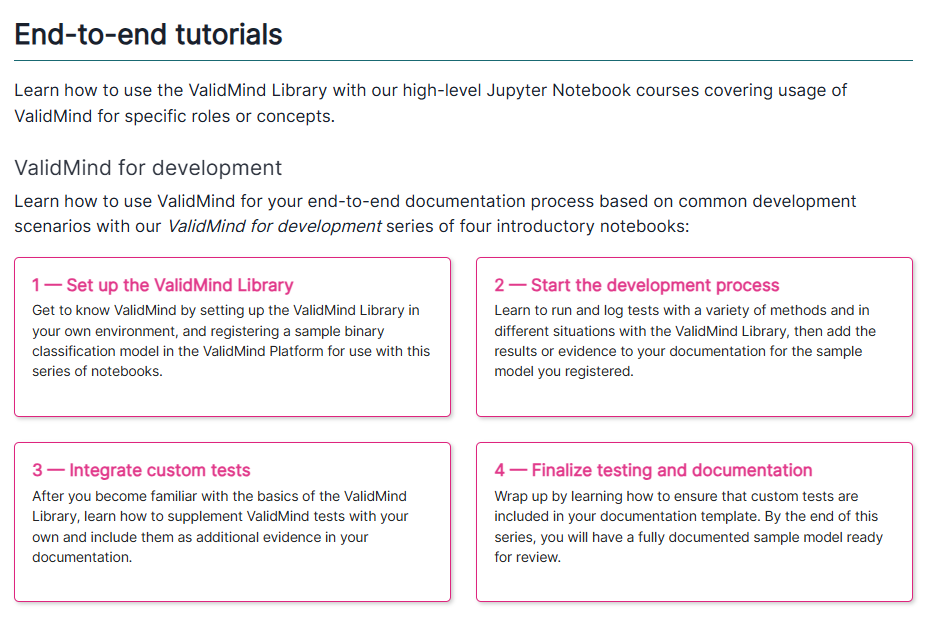
The old developer demonstration notebook that was embedded into the training, with too many concepts in one notebook without proper context for new users, and the top navigation distracting from the content:
The first of my new updated series of four developer demonstration notebooks, with concepts spilt out to match each module of the training curriculum, and a hidden top navigation when embedded into the training:13
13 Archive of validmind/documentation: View Developer Notebooks
The old validator training course, in a sparse single module without a supporting tutorial notebook:
My new validator training course, a comprehensive and guided journey broken out into four modules each with clear learning outcomes, paired with the new validator demonstration notebooks14 that culminate in a tangible and complete sample project:
14 Archive of validmind/documentation: View Validator Notebooks
The old administrator training course, in a sparse single module with little meaningful learning outcomes:
My new administrator training course, a comprehensive and guided journey broken out into four modules each with clear learning outcomes, culminating in a fully configured sample instance of ValidMind’s frontend application: