Supabase
Get started
Supabase is free to use and open-source, so you can build your own Supabase-powered applications with a very low barrier to entry.
Developer Advocacy
Use Supabase as your comprehensive backend solution.
Install Your Own:
Building a web application is a lot of moving pieces. After all, what the user interacts with is just the surface of the iceberg, so to speak.
Maybe admitting this next bit will brand me as an imposter, but I have to be honest and say that while I’m fairly comfortable with digging around in the frontend, I’ve always felt a tad intimidated by backend infrastructure. Some of the reason being that traditionally, those moving pieces were generally discrete, meaning that you had juggle a lot of different tools and services without a unified platform to help you manage them.
Enter Supabase: A comprehensive backend-as-a-service platform that provides a suite of tools to help you connect everything and oversee all the moving pieces — from your database tables, to ready-made ways to read and write those tables, to user authentication, to functions that perform tasks when a row changes, and more.
So incredibly user-friendly, that a self-professed backend novice like myself managed to cobble together a solution for my Next.js application that does exactly what I wanted it to do.
Usually, to read and write a database from a website, you’d build a small server of your own whose only job is to answer web requests and talk to the database for you. Since the program can only answer requests while it’s turned on, on a computer the internet can reach, you have to have a reliable way to keep that program running. You can keep a physical machine plugged in and connected to the internet, or hand the program to a hosting service that keeps a copy running for you.
For example, our guestbook needs functionality to:
So you invent one web address for “get the comments,” another for “save a comment,” and so on. Each address is an instruction in that program — when a request shows up, run this database query and send the result back.
You also have to protect each instruction, since not everyone should be able to perform all actions. For example, the address that saves a comment must not let a stranger delete comments. Every interaction with the database needs its own address in that program, and its own check to make sure the person asking is allowed to do that. The program that holds all of those addresses is the server you keep running.
Supabase eliminates the need to build and run a separate server just to read and write the database. Instead, you can connect directly to the database from your website using the Data REST API. Instead of inventing an address for each action, you name the table, and Supabase turns that name into the address.
Instead of putting a separate check on each address, Supabase enforces the check on the table itself using Row Level Security.1 Each request carries a token that says who is calling and what they are allowed to do, for example:
1 Supabase Docs: Database / Row Level Security
admin,3 the database runs a check called is_admin() and allows the change.2 Supabase Docs: Start with Supabase / API keys
4 beck-chan/y2k-guestbook: src/lib/supabase/server.ts
The API URL is your “RESTful endpoint for querying and managing your database.” For example, https://<your-project>.supabase.co/rest/v1/ is the front door to your tables. In our guestbook, a helper called createClient() in src/lib/supabase/server.ts4 opens that door:
return createServerClient(
  // Your Supabase project URL
  process.env.NEXT_PUBLIC_SUPABASE_URL!,
  // Your Supabase publishable key
  process.env.NEXT_PUBLIC_SUPABASE_PUBLISHABLE_KEY!,
  // ...
);
Under the hood, asking for a table becomes a normal web request to https://<your-project>.supabase.co/rest/v1/<table>:
comments_public is a table with a view of submitted comments that exclude submitted email addresses from display. The getPublicCommentsPage function reads that table in src/app/actions/comments.ts:5
5 beck-chan/y2k-guestbook: src/app/actions/comments.ts
supabase
  .from("comments_public")
  .select("id, display_name, body, created_at, updated_at", { count: "exact" })
  .order("created_at", { ascending: false })
comments is the private table that stores submitted comments. The submitComment function in src/app/actions/comments.ts6 writes to this table.
6 beck-chan/y2k-guestbook: src/app/actions/comments.ts
Comments are first checked for length, content, and frequency.7 Only if all checks pass, then the comment is written to the comments table:
const supabase = await createClient();
const { error } = await supabase.from("comments").insert({
  display_name: name,
  email: email || null,
  body,
});
The loadAdminComments function in src/app/actions/comments.ts8 reads the private comments table for the dashboard:
8 beck-chan/y2k-guestbook: src/app/actions/comments.ts
supabase
  .from("comments")
  // Display the email address to administrators
  .select("id, display_name, email, body, is_read, created_at, updated_at")
  .order("created_at", { ascending: false })
The updateComment, deleteComment, setCommentRead, and setCommentsRead functions allow administrators to edit and delete comments, as well as toggle comment read status:
// updateComment
supabase
  .from("comments")
  .update({
    display_name: name,
    email: email || null,
    body,
  })
  .eq("id", input.id)

// deleteComment
supabase.from("comments").delete().eq("id", id)

// setCommentRead
supabase.from("comments").update({ is_read: read }).eq("id", id)

// setCommentsRead
supabase.from("comments").update({ is_read: read }).in("id", uniqueIds)
Permission to modify comments is enforced by row-level security rules, that we set when we created the comments table with scripts/schema.sql:9
9 beck-chan/y2k-guestbook: scripts/schema.sql
create policy "admin_update_comments"
  on public.comments
  for update
  to authenticated
  using (public.is_admin())
  with check (public.is_admin());

create policy "admin_delete_comments"
  on public.comments
  for delete
  to authenticated
  using (public.is_admin());
Both policies call the is_admin() function defined in scripts/schema.sql:10
10 beck-chan/y2k-guestbook: scripts/schema.sql
select coalesce(
  (auth.jwt() -> 'app_metadata' ->> 'role') = 'admin',
  false
);
The app reads that same note in src/lib/adminAuth.ts:11
11 beck-chan/y2k-guestbook: src/lib/adminAuth.ts
const {
  data: { user },
} = await supabase.auth.getUser();
if (roleOf(user) === "admin") {
  return true;
}
The guestbook_settings table is one record with the comment length, the speed limit, and how many notes fit on a page. The loadGuestbookSettings function in src/lib/loadGuestbookSettings.ts12 reads these saved settings:
12 beck-chan/y2k-guestbook: src/lib/loadGuestbookSettings.ts
supabase
  .from("guestbook_settings")
  .select("*")
  .eq("id", 1)
  .maybeSingle()
saveGuestbookSettings in src/app/actions/settings.ts13 allows administrators to adjust these settings, first checking that the user is an admin:
13 beck-chan/y2k-guestbook: src/app/actions/settings.ts
const { supabase, error: authError } = await requireAdmin();
if (!supabase) {
  return { ok: false, error: authError };
}
Only if that check passes, then the settings row is edited:
supabase.from("guestbook_settings").update(row).eq("id", 1)
Usually, to allow users to log in using Google single sign-on, you’d run your own login service. You register your application with Google, store users in a table you maintain, hand the browser a cookie that says they are signed in, and remember to check that cookie on every private page.
For example, our guestbook needs functionality to:
admin onto the login, and again on a later sign-in if the mark is missing./admin only when the session note says admin.You invent checks for “is this address allowed,” another for “does this session say admin,” and so on, and protect each check since not everyone who can sign in with Google should be able to open the admin dashboard. Each check is an instruction in that login service — when a sign-in shows up, look up the address and send the result back. For our guestbook, one missed check and a stranger could open your administrator dashboard.
Supabase eliminates the need to build and run a separate login service just to sign admins in with Google. Instead, Supabase Auth holds the admin users in a table for you, manages the browser cookies for signed-in sessions, and checks for that cookie on your administrator dashboard.
Instead of inventing a check for each private page, the session carries the admin note, and the dashboard reads that note:
admin_allowlist is the approved list of addresses that may open the administrator dashboard after a Google sign-in. The loadAllowlist function in supabase/functions/_shared/allowlist.ts14 reads this private table with your Supabase secret keys:15
14 beck-chan/y2k-guestbook: supabase/functions/_shared/allowlist.ts
15 Supabase Docs: Edge Functions / Environment variables
const url = Deno.env.get("SUPABASE_URL");
const secretKeys = JSON.parse(Deno.env.get("SUPABASE_SECRET_KEYS") ?? "{}");
const key = secretKeys.default;

const supabase = createClient(url, key, {
  auth: { persistSession: false, autoRefreshToken: false },
});
const { data, error } = await supabase.from("admin_allowlist").select("email");
When an authorized admin user signs in for the first time, the hook_before_user_created function created by scripts/schema.sql16 reads the admin_allowlist:
16 beck-chan/y2k-guestbook: scripts/schema.sql
if user_email is null
   or user_email = ''
   or not exists (
     select 1 from public.admin_allowlist where email = user_email
   ) then
  return jsonb_build_object(
    'error',
    jsonb_build_object(
      'message', 'Not authorized',
      'http_code', 403
    )
  );
end if;
Only if the address is on the admin_allowlist, then the sign-in is allowed to continue.
Only if the address is on the admin_allowlist, then app_metadata.role set to admin is written onto the new login:
return jsonb_build_object(
  'user',
  jsonb_build_object(
    'app_metadata',
    jsonb_build_object('role', 'admin')
  )
);
The ensure_admin_role function we created with scripts/schema.sql confirms that the user’s email address is on the list:
if user_email is null
   or not exists (
     select 1 from public.admin_allowlist where email = user_email
   ) then
  return false;
end if;
Only if the address is on the admin_allowlist, and the saved login does not already say admin, then it writes app_metadata.role set to admin. That covers a later sign-in where the mark may be missing:
update auth.users
set raw_app_meta_data =
  coalesce(raw_app_meta_data, '{}'::jsonb) || '{"role":"admin"}'::jsonb
where id = uid
  and coalesce(raw_app_meta_data->>'role', '') is distinct from 'admin';
The is_admin() function defined in scripts/schema.sql17 trusts only the app_metadata.role note set to admin. src/proxy.ts18 runs this check on /admin:
17 beck-chan/y2k-guestbook: scripts/schema.sql
18 beck-chan/y2k-guestbook: src/proxy.ts
The role on the session is read first:
const role =
  user && typeof user.app_metadata?.role === "string"
    ? user.app_metadata.role
    : null;
const isAdmin = role === "admin";
Then, depending on the user’s authorization or session status, they are redirected to the appropriate page:
// If there is no session yet, they are sent to `/admin/login`
if (!user) {
  const loginUrl = request.nextUrl.clone();
  loginUrl.pathname = loginPath;
  loginUrl.search = "";
  return redirectWithCookies(loginUrl, supabaseResponse);
}

if (!isAdmin) {
// If the note does not say admin, they are signed out and sent home with `?admin_error=1`
  await supabase.auth.signOut();
  const homeUrl = request.nextUrl.clone();
  homeUrl.pathname = guestbookHomePath();
  homeUrl.search = "admin_error=1";
  return redirectWithCookies(homeUrl, supabaseResponse);
}

if (isLogin) {
// If they are already signed in as an admin, they go straight to the dashboard
  const adminUrl = request.nextUrl.clone();
  adminUrl.pathname = adminPath;
  adminUrl.search = "";
  return redirectWithCookies(adminUrl, supabaseResponse);
}You know the drill — usually, notifications are handled by another small server of your own, whose only job is to notice changes to your database and send the email.
For example, our guestbook needs functionality to notify on:
Every kind of notification needs its own invented web address, an instruction — when a change shows up, fill in the message and send the email. Each instruction is protected since not everyone should be able to trigger the mail just because they know the webhook endpoint.
Supabase eliminates the need to build and run a separate server just to send email notifications. The database calls an Edge Function when a row changes, and instead of inventing an address for each message, the webhook delivers that change to the function:
NOTIFY_WEBHOOK_SECRET and FLAG_NOTIF are secrets stored on the Edge Function. supabase/functions/_shared/env.ts19 reads them with Deno.env:
19 beck-chan/y2k-guestbook: supabase/functions/_shared/env.ts
const expected = Deno.env.get("NOTIFY_WEBHOOK_SECRET") ?? "";const v = (Deno.env.get("FLAG_NOTIF") ?? "").trim().toLowerCase();
return v === "true" || v === "1";Any call that doesn’t carry the secret is refused, and no notifications are sent with the switch is set to false:
if (!verifyNotifySecret(req)) {
  return jsonResponse(401, { error: "Unauthorized" });
}
if (!flagNotifOn()) {
  return jsonResponse(200, { skipped: "FLAG_NOTIF" });
}
Supabase posts the row change to supabase/functions/notify-admins/index.ts,20 which sends admin notifications on comments received, edited, deleted, or guestbook settings updated. The body names the table, the kind of change, and the row:
20 beck-chan/y2k-guestbook: supabase/functions/notify-admins/index.ts
type WebhookPayload = {
  type?: string;
  table?: string;
  schema?: string;
  record?: Record<string, unknown> | null;
  old_record?: Record<string, unknown> | null;
};

const table = payload.table ?? "";
const type = (payload.type ?? "").toUpperCase();
const record = payload.record ?? null;
const oldRecord = payload.old_record ?? null;
record is the new row. old_record is the row before the change. The same function switches on table instead of a separate address for each message:
if (table === "comments") {
  if (type === "INSERT") {
    const id = str(record?.id) || "new";
  }
  if (type === "UPDATE") {
    if (!commentContentChanged(oldRecord, record)) return [];
  }
  if (type === "DELETE") {
    const id = str(oldRecord?.id) || "deleted";
  }
}

if (table === "guestbook_settings") {
  if (type !== "UPDATE") return null;
}

if (table === "admin_allowlist") {
  if (type === "INSERT") {
    const added = asEmail(record?.email);
  }
  if (type === "DELETE") {
    const removed = asEmail(oldRecord?.email);
  }
}supabase/functions/on-user-created/index.ts21 reads the email from the body Supabase posts to notify admins on the allow-list when a new admin has signed in for the first time:
21 beck-chan/y2k-guestbook: supabase/functions/on-user-created/index.ts
const record = root.record;
if (record && typeof record === "object") {
  const fromRecord = asEmail((record as Record<string, unknown>).email);
  if (fromRecord) return fromRecord;
}

const user = root.user;
if (user && typeof user === "object") {
  const fromUser = asEmail((user as Record<string, unknown>).email);
  if (fromUser) return fromUser;
}
To stop spam, you’d build another small store of your own, or keep the count in the memory of whichever copy of the site happened to answer. Restart that store and the count forgets everyone, or two copies of the site can disagree about whether this person already posted.
For example, our guestbook needs functionality to limit:
Invent one counter for the short window, another for the day, and so on. Each counter is a record in that store — when a comment shows up, spend one chance and send the result back. You also have to protect each counter, since the browser must not be able to reset it.
Supabase eliminates the need to build and run a separate counter store. The counters live in the Postgres database the project already has — submitComment spends one chance by calling consumeCommentRateLimit in src/lib/rate-limit.ts:22
22 beck-chan/y2k-guestbook: src/lib/rate-limit.ts
Each count goes through a shared DATABASE_URL door that lends out a database connection for one query, then takes it back. The next query may get a different connection, so this code does not ask the database to remember the query under a name. It sends the query and the values again each time, and the count gets saved:
const connectionString = process.env.DATABASE_URL?.trim();

return pgPool.query({
  text: config.text,
  values: config.values,
});rate-limiter-flexible23 saves the counts in a table called guestbook_rate_limits — a visitor’s browser cannot change that table, preventing users from overriding the limit:
23 animir: node-rate-limiter-flexible
new RateLimiterPostgres({
  storeClient,
  storeType: "pool",
  points: opts.points,
  duration: opts.duration,
  keyPrefix: opts.keyPrefix,
  tableName: "guestbook_rate_limits",
  tableCreated: tableReady,
})
The table stores a scrambled internet address, so the limit can tell people apart without keeping a readable address. The function spends one chance in the short window and one in the daily window only when both still have room:
const key = createHash("sha256").update(ip || "unknown").digest("hex").slice(0, 32);

await daily.consume(key);
await burst.consume(key);To serve a chatbot that searches documentation for questions asked, you’d build a second search server. You copy the docs into that server, and keep that copy in step with the real pages, or the answers drift.
For example, the docs chatbot needs functionality to:
You invent a search address, an instruction — when a question shows up, find the closest pages and send the excerpts back, for “the meaning of this question,” and another for “these exact words.” Each address is an instruction in that second server — when a question shows up, find the closest pages and send the excerpts back.
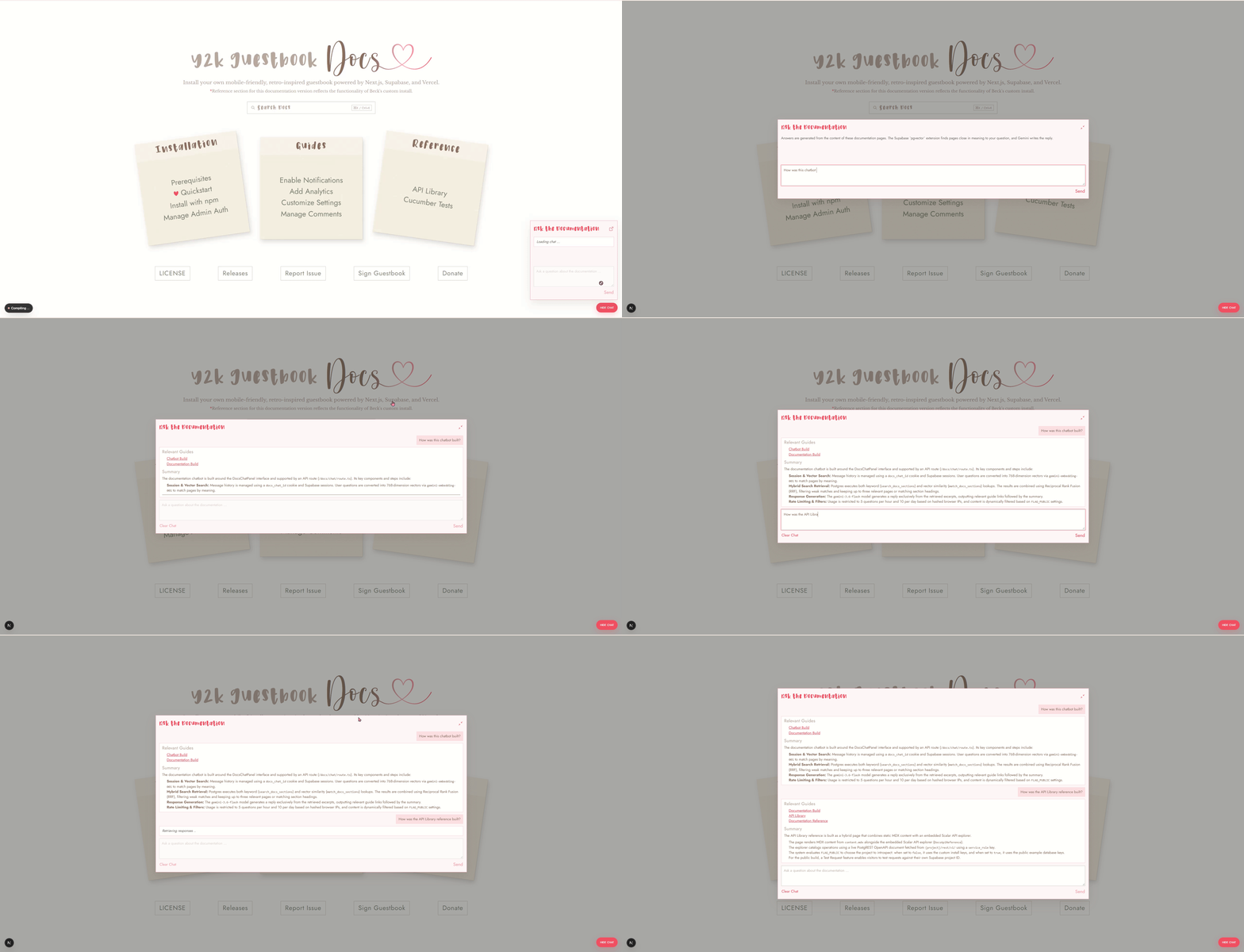
pgvectorSupabase eliminates the need to build and run that second search server. Instead, documentation chunks are stored in a table called docs_section:
Gemini turns each chunk of the docs into a list of numbers that stands in for its meaning. Those numbers are called an embedding. pgvector stores that list in docs_section as a vector of 768 numbers, next to the words they came from.
When the docs_query_embedding table was created, this column is defined in scripts/supabot.sql:24
24 beck-chan/guestbook: scripts/supabot.sql
embedding extensions.vector(768) not null,A question becomes the same kind of list. The match_docs_sections function created in scripts/supabot.sql25 finds the chunks whose lists are closest. <=> is cosine distance. A smaller distance means the meanings are closer:
25 beck-chan/guestbook: scripts/supabot.sql
select *
from public.docs_section
where (not only_public or public)
order by embedding <=> query_embedding
limit least(match_count, 50);
The search_docs_sections function looks for the exact words:
select *
from public.docs_section
where (not only_public or public)
  and search_vector @@ to_tsquery('english', query)
order by ts_rank_cd(search_vector, to_tsquery('english', query)) desc
limit least(match_count, 50);
The chat keeps the pages that do well on either test, and the reply links back to those pages.
My dilemma before I built the application was the number of separate programs a simple guestbook interface seems to need. A server to read and write comments. A login service for the admin dashboard, another server to send notifications when a row changes, a counter store so a script cannot fill the board, a second search server for the docs chatbot.
Each one has to stay running, and each one needs its own check so a stranger cannot do what only an admin should do. Phew — I wasn’t sure I wanted to take on all of that just to pay idle homage to a fond childhood memory.
For a moment, I understood why the guestbooks of yore were so, well, rudimentary, and why they relied on insecure methods to allow users to make changes to frontend code instead of integrating a proper backend, and had absolutely no checks in place to prevent a stranger from potentially doing some very nefarious things.
I suppose the 90s were a more trusting time, or maybe I just didn’t think about it as much. Probably a mix of both.